Independent overview by Netops24 — not the official ManageEngine (Zoho) website.
Enterprise Network Monitoring
ManageEngine OpManager review — per-device pricing and the add-on question
OpManager's editions, per-device licence bands and add-ons explained for buyers, with realistic scaling notes for 50, 250 and 1,000 devices and a plan for the 30-day trial.
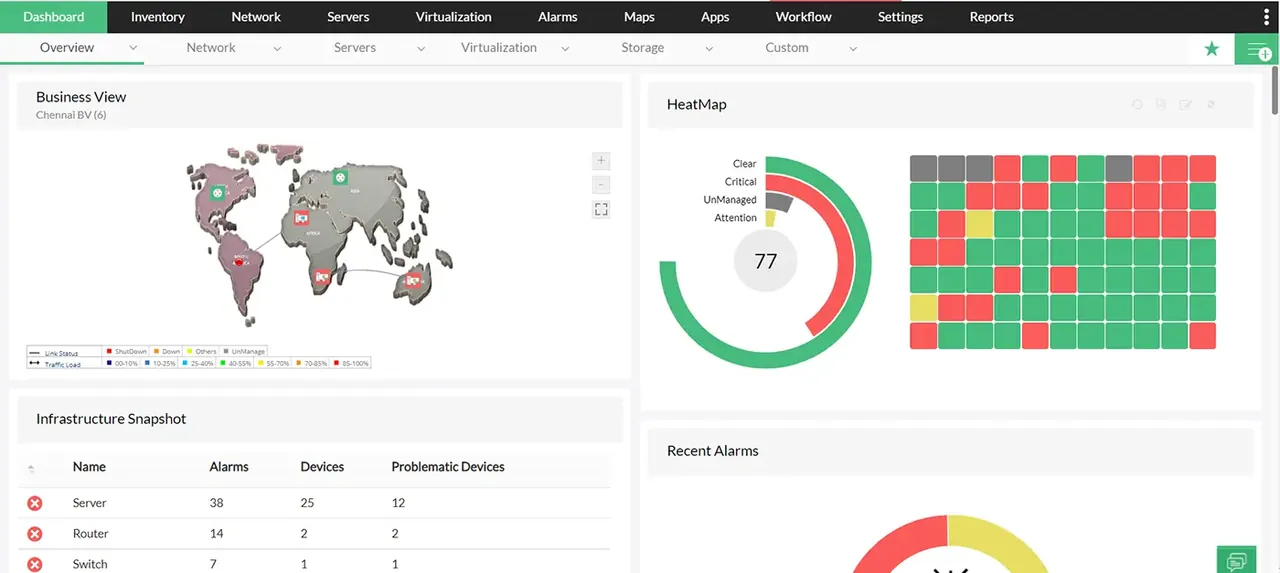
When an OpManager quote arrives, the headline number usually looks pleasantly low. The work is reading the second page: which edition you were quoted, how many devices it covers, and which of the add-ons your team demoed are actually in it. Picture a typical 220-device mixed estate — two sites, a Hyper-V cluster, Meraki and HP switching — and a running list of every line item that tends to surface as the quote comes together.
What it does
OpManager is ManageEngine’s (Zoho’s) network and server monitoring platform. It discovers devices over SNMP, WMI, SSH and ICMP, applies device templates, and tracks availability, interface traffic, CPU, memory, disk and hardware health. It adds workflow automation (run a script or restart a service when a threshold trips), a business-view map builder, virtualization monitoring for VMware, Hyper-V and Nutanix, and a mobile app. The self-hosted server runs on Windows or Linux with a bundled PostgreSQL database, or Microsoft SQL Server if you prefer.
Where it is strong
- Low entry cost per device. For a mid-size estate, the per-device quote typically undercuts the big-name competitors, based on published starting prices.
- Linux or Windows server. Teams that do not want another Windows Server can run it on Linux, which is rare among the commercial tools here.
- Workflow automation included. Basic auto-remediation is part of the core product rather than a separate orchestration purchase.
- A consistent suite. Flow analysis, configuration backup, firewall log analysis and IP address management all exist as ManageEngine add-ons that plug into the same console.
Where it falls short, and who should skip it
- Add-ons add up. NetFlow Analyzer, Network Configuration Manager, Firewall Analyzer and OpUtils (IP and switch-port management) are each priced separately. Buyers commonly find a “full” quote running roughly double the base licence once configuration backup and flow analysis are added in — ask for an itemised quote covering all four before comparing totals.
- The interface feels dense. There are many menus and some settings live in unexpected places. Plan training time.
- Edition limits matter. Distributed monitoring (probes at remote sites reporting to a central server) sits in the Enterprise edition, so multi-site buyers can find the Standard or Professional quote does not fit.
- Support quality varies by tier. Standard support is ticket-based; faster response costs more.
- Skip it if your team has no time to tune templates and thresholds. Out of the box, OpManager alerts on a lot, and alert fatigue arrives in week one.
Who it suits
Cost-conscious IT departments with 50 to several thousand devices, a single admin or a small network team, and a mix of servers and network gear. It suits organisations already using other ManageEngine tools (ServiceDesk Plus, Endpoint Central), where integration pays off.
Licensing and what it costs at 50, 250 and 1,000 devices
OpManager is sold in Standard, Professional and Enterprise editions, licensed by number of monitored devices in fixed bands, as an annual subscription or a perpetual licence with annual maintenance. At the time of writing ManageEngine lists starting prices on its site and quotes larger bands on request — check the vendor’s pricing page for current figures.
How the bands behave in practice:
- ~50 devices: the Standard or Professional edition in a small band. Base licence cost is modest; the add-ons you choose will decide the total. A single VM is enough for the server.
- ~250 devices: Professional covers most single-site needs. If you have branches with their own polling needs, you are into Enterprise. Budget configuration management here — at this size, config backups start to matter.
- ~1,000 devices: Enterprise with remote probes. Price per device drops at this band, but the server needs real resources (we would plan 16 GB RAM and SSD storage) and MS SQL Server may be recommended over the bundled database, which adds a licence.
Other hidden costs: training, the database licence at scale, add-on renewals (each has its own maintenance line), and staff time tuning alert thresholds. Lock-in is moderate: device lists export easily, but workflows, business views and historic data stay behind.
Running the 30-day trial
ManageEngine offers a 30-day trial with the full feature set. Use it to count real devices (the licence counts devices, not interfaces, so confirm how stacked switches and virtual hosts are counted), test the workflow automation on one noisy alert, and price the add-ons you actually used during the trial. Our trial plan has a day-by-day structure.
How it compares
Against PRTG, the core difference is per-device versus per-sensor pricing — see PRTG vs OpManager. SolarWinds NPM goes deeper on network troubleshooting at a higher total cost, and Zabbix is the do-it-yourself baseline if licence spend must be zero. See the enterprise shortlist and the small-business shortlist for the full comparison tables, and pricing models explained for how per-device bands stack up against per-sensor and per-node.
Getting it safely
Start the trial from manageengine.com only; ManageEngine links out to its own subdomains for the trial form and the files. Verify that the package is signed by Zoho Corporation before running it, and keep the trial server patched — ManageEngine ships frequent security updates, and your production deployment should follow them promptly. Our where to get it page covers the verification steps.
FAQ
What counts as a device?
Generally any monitored IP-addressed node: a switch, server, firewall or printer. Interfaces on a switch do not count separately. Clarify how virtual machines and cluster members are counted on the quote.
Can we start with Standard and upgrade later?
Yes. Edition upgrades are priced as the difference, but moving to Enterprise changes the architecture (probes), so plan it rather than doing it mid-crisis.
Is config backup included?
Not in the base product. It comes from Network Configuration Manager, which is a separate add-on.
Is there a cloud-hosted version?
ManageEngine offers a SaaS monitoring product under the Site24x7 brand; OpManager itself is self-hosted.
Before you start a ManageEngine OpManager evaluation
Netops24 does not sell ManageEngine OpManager and hosts no files for it. Start your evaluation on ManageEngine (Zoho)’s own site, check the address bar shows manageengine.com, and read our where-to-get checklistfor what a trial sign-up normally asks for. Our verdict label is explained on the methodology page.