Independent overview by Netops24 — not the official Zabbix website.
Network Monitoring for Small Business
Zabbix review — the do-it-yourself baseline, and what 'free' costs in staff time
Zabbix as the zero-licence baseline for network monitoring: what it does, what it costs in people and infrastructure at 50, 250 and 1,000 devices, and when paid support makes sense.
Every commercial quote on this site should be compared against one number: what it would cost to do the job with Zabbix. The licence fee is zero, which makes that comparison look easy. It is not, because the real price is engineering hours. Picture estates ranging from a 40-device office to a 1,200-host mixed environment: this review is an attempt to put a realistic figure on those hours so you can compare fairly.
What it does
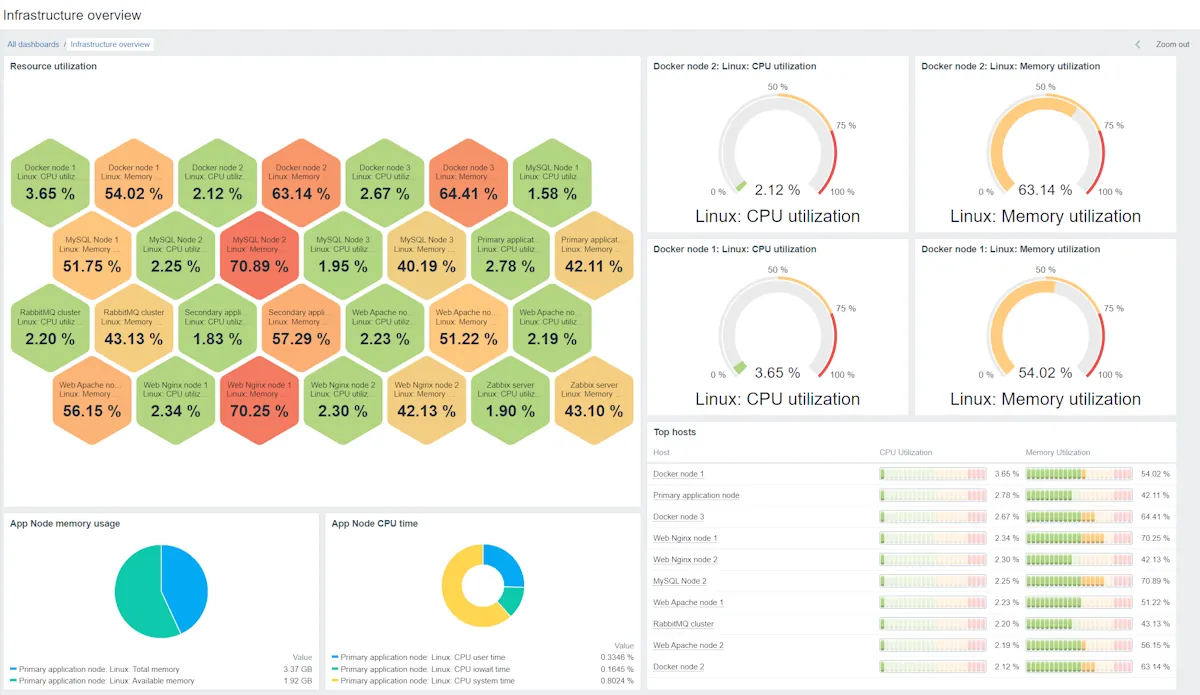
Zabbix is an open-source monitoring platform released under the AGPLv3 licence (from version 7.0; earlier releases were GPLv2). It collects metrics from servers via its own agent, from network devices via SNMP (v1, v2c, v3) and SNMP traps, from applications via HTTP, JMX, ODBC and scripts, and from cloud and virtualization platforms through templates. Data is stored in MySQL/MariaDB or PostgreSQL (optionally with TimescaleDB), and the web front end provides dashboards, maps, graphs, triggers, escalations and a flexible alerting engine. Zabbix proxies collect data at remote sites and forward it to the central server.
Where it is strong
- No licence cost, no feature gating. Every feature is available in the open-source release. There is no “enterprise edition” held back.
- Scale. With proxies and a well-tuned database, Zabbix handles tens of thousands of devices.
- Template library. Official and community templates cover most network vendors, operating systems and common applications.
- Flexibility. Low-level discovery, calculated items, custom scripts and a full API mean almost anything measurable can be monitored.
- Long-term support releases. LTS versions are supported for several years, which suits conservative change management.
Where it falls short, and who should skip it
- Staff time is the price. Tuning templates, writing triggers, sizing the database and managing housekeeping take real hours. As a rough estimate, standing up a production-grade system takes a few days for 50 devices, and one to two weeks for 1,000.
- The interface is functional, not friendly. Newer releases improved it, but it still assumes a technical operator.
- Alert noise out of the box. Default templates trigger on a lot. Expect to spend time disabling and adjusting triggers before alerts are trusted.
- No vendor accountability by default. Without a support subscription, you rely on community forums and your own skills when something breaks at 2 a.m.
- Skip it if you have no Linux or database skills in-house, or if you need a working dashboard by Friday.
Who it suits
Technical teams with Linux and SQL experience, organisations with strict budget limits on licences but flexible staff time, and larger enterprises that want full control and are prepared to invest in expertise (or buy Zabbix’s support). It is also the natural benchmark in any tender.
Licensing and what it costs at 50, 250 and 1,000 devices
The software itself is free to use under AGPLv3. Zabbix LLC sells optional support subscriptions in several tiers, training and certification, and consulting; it also offers a hosted Zabbix Cloud service at the time of writing. Support pricing is quote-based — check the vendor’s pricing page.
Here is a rough model of the real cost (staff hours are estimates; put your own hourly rate in):
- ~50 devices: one VM (4 vCPU, 8 GB RAM) runs server, database and front end. Setup 3–5 days; ongoing about 2–4 hours a month. The cost is almost entirely staff time.
- ~250 devices: separate the database onto its own VM with SSD storage, add proxies at remote sites. Setup 1–2 weeks; ongoing roughly a day a month for template and trigger maintenance.
- ~1,000 devices: a dedicated database server (PostgreSQL with TimescaleDB recommended), several proxies, possibly high availability for the server. Setup 2–4 weeks for an experienced engineer; ongoing 2–4 days a month. At this size, a support subscription is usually cheaper than an outage.
Hidden costs: hardware or VMs, database storage growth, training for anyone other than the original builder, and the “key person risk” if only one engineer understands the system. Lock-in is low for the software — it is open source and data is in a standard database — but high for knowledge: your custom templates are your own.
“Trial” with Zabbix
There is no trial; the full product is always available. The equivalent is a two-week proof of concept: monitor 20 representative devices, including your trickiest network gear, and time how long template and trigger tuning takes. Multiply that effort up and compare it with commercial quotes. Our requirements checklist provides the criteria.
How it compares
LibreNMS is the other do-it-yourself baseline — faster to get useful network-only monitoring, less flexible beyond it. Checkmk offers an open-core path with much more automatic discovery. PRTG and ManageEngine OpManager are the commercial tools most often compared with Zabbix. See the small-business shortlist, the enterprise shortlist, and pricing models explained.
Getting it safely
Get Zabbix packages only from zabbix.com or the official Zabbix repositories for your Linux distribution. The repositories are GPG-signed; import the Zabbix signing key and let your package manager verify signatures. Container images come from Zabbix’s own registry accounts. Our where to get it page explains the checks.
FAQ
Is Zabbix really free for commercial use?
Yes. The AGPLv3 licence allows commercial use without a licence fee. Paid support is optional.
How many devices can one server handle?
Thousands, with proxies and a tuned database; large deployments monitor tens of thousands. Performance depends mostly on database design and the number of items per device.
Do we need the Zabbix agent?
For servers, yes, for the richest data. Network devices are monitored agentless via SNMP.
What is the biggest hidden cost?
Time: especially tuning triggers so alerts are trusted, and keeping templates current as devices change.
Before you start a Zabbix evaluation
Netops24 does not sell Zabbix and hosts no files for it. Start your evaluation on Zabbix’s own site, check the address bar shows zabbix.com, and read our where-to-get checklistfor what a trial sign-up normally asks for. Our verdict label is explained on the methodology page.