Independent overview by Netops24 — not the official Anton Keks website.
Discovery & Troubleshooting Tools
Angry IP Scanner review — the free device count to bring to every monitoring quote
Angry IP Scanner as a buyer's tool: a free, open-source sweep of your own subnets that gives you an independent device count before PRTG, Auvik or OpManager quote, and a yardstick for their auto-discovery during the trial.
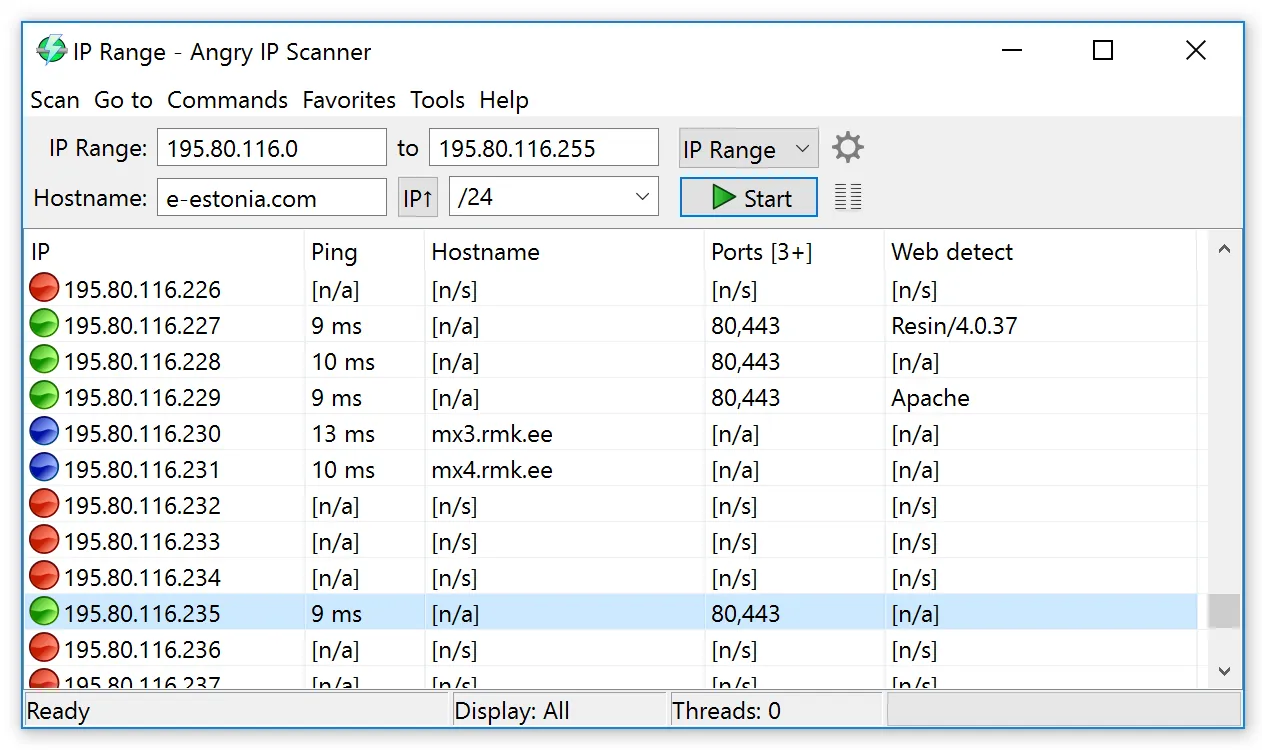
The first question on nearly every monitoring sales call is some version of “how many devices have you got?”, and the honest answer in most small and mid-sized organisations is “roughly”. Roughly is expensive. Sensor-tiered, device-tiered and per-node licences all start from that number, and if the only count in the room comes from the vendor’s own discovery, the vendor has effectively sized your contract. Angry IP Scanner is a small, free desktop program that lets you walk into that call with a figure of your own, gathered in an afternoon from networks you manage.
Use with authorization only. Sweep only address ranges you own or are formally responsible for. On shared or provider-managed infrastructure, get written permission first, and tell your security team before you start — a sweep can look like reconnaissance to an intrusion detection system.
What it does
Angry IP Scanner, written and maintained by Anton Keks and released under the GPLv2 licence, takes a list of addresses and checks each one to see whether anything answers. You give it a range (for example 10.20.0.1 to 10.20.3.254), a subnet, or a text file of addresses, and it probes them in parallel threads. For every live host it can add columns of detail: the hostname from reverse DNS, response time, TTL, open ports from a list you choose, NetBIOS information on Windows networks, and the MAC address and hardware vendor when the host is on the same local segment as your machine.
The results sit in a sortable table that exports to CSV, plain text or XML. That export is the whole point for a buyer: it becomes the raw material for a device inventory spreadsheet you can classify, total and hand to every vendor in the same form. The program runs on Windows, macOS and Linux; it is Java-based, and the project site explains what each platform needs. It needs no server, agent or account, and a command-line mode lets you repeat a sweep and compare files.
It keeps no history, raises no alerts and does not poll SNMP. It is a snapshot: who answered, at the moment you asked.
Where it’s strong for a buyer
- An independent baseline before quotes. Sweep each VLAN, export, add a “type” column, and you have a count that no vendor produced. Our PRTG sensor estimate guide shows how a device list turns into a sensor figure; this is the quickest way to build that list if your asset register is stale.
- Checking a trial’s auto-discovery. Run the same sweep during week one of an Auvik, PRTG or OpManager trial and compare. Devices the product missed will be unmonitored after purchase; devices it found that your sweep did not (because they block ICMP, say) tell you the product’s discovery is doing real work.
- Finding the billable surprises. Printers, IP phones, cameras and access points turn up in bulk on a sweep. Whether a vendor counts them is a contract question worth asking before discovery adds them to your licence.
Where it falls short, and who should skip it
A ping sweep is a floor, not a census. Hosts whose firewalls drop ICMP will appear dead unless you add port probes; laptops that are asleep or off-site will be missed; and any subnet your workstation cannot route to is invisible. MAC addresses only resolve on your local segment, because they come from ARP.
It is also not a monitoring product, and anyone expecting alerts, graphs or topology maps should look at the free discovery and troubleshooting shortlist alongside LibreNMS or Zabbix instead. A current, trusted IPAM makes it little more than a cross-check.
Who it suits
- IT managers about to request two or three monitoring quotes who want the same device list in every one.
- Small-business owners who suspect the “about eighty devices” figure is out of date.
Licensing and cost
There is no licence fee: Angry IP Scanner is free, open-source software under the GPLv2. There is no paid edition, no trial clock and no per-device count. The real costs are small but worth naming: an hour or two to sweep and classify a mid-sized network, time to reconcile the results with DHCP leases and switch MAC tables, and a conversation with whoever owns security so that the sweep is expected.
How the paid platforms turn that count into a bill is covered in our pricing models guide.
How it compares
Angry IP Scanner sits upstream of the monitoring platforms rather than competing with them. Paid products discover more thoroughly, using SNMP, WMI and vendor APIs to identify make, model and role, but their discovery belongs to the product you are evaluating; your own sweep does not. LibreNMS is the closest free alternative for ongoing discovery, but it needs a Linux server and SNMP credentials, so it is a platform decision rather than an afternoon’s check.
Its natural partner is Wireshark. The scanner tells you what is on the network; packet capture tells you what the monitoring collector is actually saying to it when a trial result looks wrong. Our two-week trial plan builds both checks into the schedule, and the Auvik vs PRTG comparison explains how differently two vendors count the same network.
Getting it safely
Get Angry IP Scanner only from the project’s own site at angryip.org, reached by typing the address or using the link on this page. Avoid look-alike domains and copies bundled on file-sharing or “utility” sites; network tools are a favourite target for repackaging. Where the project publishes checksums or signed release information, compare them before running the file, and on Windows check the file’s properties for a valid digital signature where one is present. Our where to get it safely page walks through domain checks and hash verification with example commands.
FAQ
Is Angry IP Scanner really free?
Yes. It is open-source software released under the GPLv2, with no paid tier, no registration and no device limit. Links to the project on this site go directly to angryip.org.
Will it tell me how many PRTG sensors I need?
Not directly. It tells you how many devices answer. Classify that list by type, then apply per-device sensor estimates as described in our sensor count guide. The sweep makes the estimate honest; it does not replace it.
Why did my sweep find fewer devices than the vendor’s trial?
Usually because some hosts ignore ping, or sit on subnets your workstation cannot reach. Add port probes for common services, run the sweep from a machine on each segment, and compare again. The reverse gap, where the vendor finds fewer, often means its collector lacks routes or credentials.
Before you start a Angry IP Scanner evaluation
Netops24 does not sell Angry IP Scanner and hosts no files for it. Start your evaluation on Anton Keks’s own site, check the address bar shows angryip.org, and read our where-to-get checklistfor what a trial sign-up normally asks for. Our verdict label is explained on the methodology page.